


IMac Repair in Toronto: Understand Repair Prices and Costs
An iMac screen repair can cost more or less depending on the model, display assembly and damage. For iMac repair in Toronto, the price depends on the work required, so there isn’t one rate for every computer. A cracked display and an issue affecting another component may need different repairs.
It’s understandable to want a clear estimate before deciding what to do. This guide explains what affects iMac repair and screen replacement costs, what a diagnostic can reveal, and how an assessment helps identify the work needed before you approve it.
You’ll also learn what to look for when choosing a Toronto repair shop, including a clear explanation of the issue and warranty details for installed parts. This makes it easier to compare estimates and understand what each one covers before moving ahead.
Table of Contents
Apple repair estimates and out-of-warranty costs
Start by distinguishing Apple warranty coverage from out-of-warranty service. Apple’s Limited Warranty covers manufacturing issues for one year from the purchase date. It doesn’t cover accidental damage or batteries that wear down through normal use. A cracked iMac display, for example, may not be covered if impact caused the damage.
AppleCare for Mac covers the computer, its battery and the included power adapter for accidental damage. Since coverage affects service fees, identify your plan before comparing estimates. For Mac service covered by AppleCare, the service fee is the same at Apple and all Apple Authorized Service Providers. For other out-of-warranty repairs, Authorized Service Providers set their own service fees and provide their own estimates.
An estimate should connect the reported symptom to the proposed repair. A screen that stays dark, for example, may need different work from a display with visible impact damage. The model and diagnostic findings help determine whether the issue involves the screen or another component. In Toronto, look for an estimate that describes the proposed work and what the quote covers.
Before approving work, ask how technicians handle another fault discovered during disassembly. A clear estimate separates the approved repair from newly identified work and explains how changes are handled. Keep a copy of the written estimate and your approval. If the proposed work changes, compare the revised scope with the original before authorizing anything else.
Warranty terms matter too. Apple guarantees its repair service and replacement parts for 90 days or the remaining term of the Apple warranty, whichever is longer. Independent repair shops set their own parts and labour terms. A practical benchmark is a written warranty covering at least 30-90 days, as recommended in this guide. Check whether it covers both the installed part and labour needed to address a covered fault.
Read warranty exclusions carefully. Coverage may distinguish a fault in the installed component from new accidental damage. Keep the service record, estimate and receipt together. These documents identify the repair date, replaced part and agreed work if an issue arises later. Review the warranty terms in writing before authorizing the repair.
For iMac repair in Toronto, the price depends on the case and is provided after a quote request. The iMac model, failed component, parts required and repair scope all affect the estimate. Compare those details alongside warranty coverage, not just the final amount. A written scope gives you a clearer basis for deciding whether the proposed repair meets your needs.
IMac repair and screen replacement
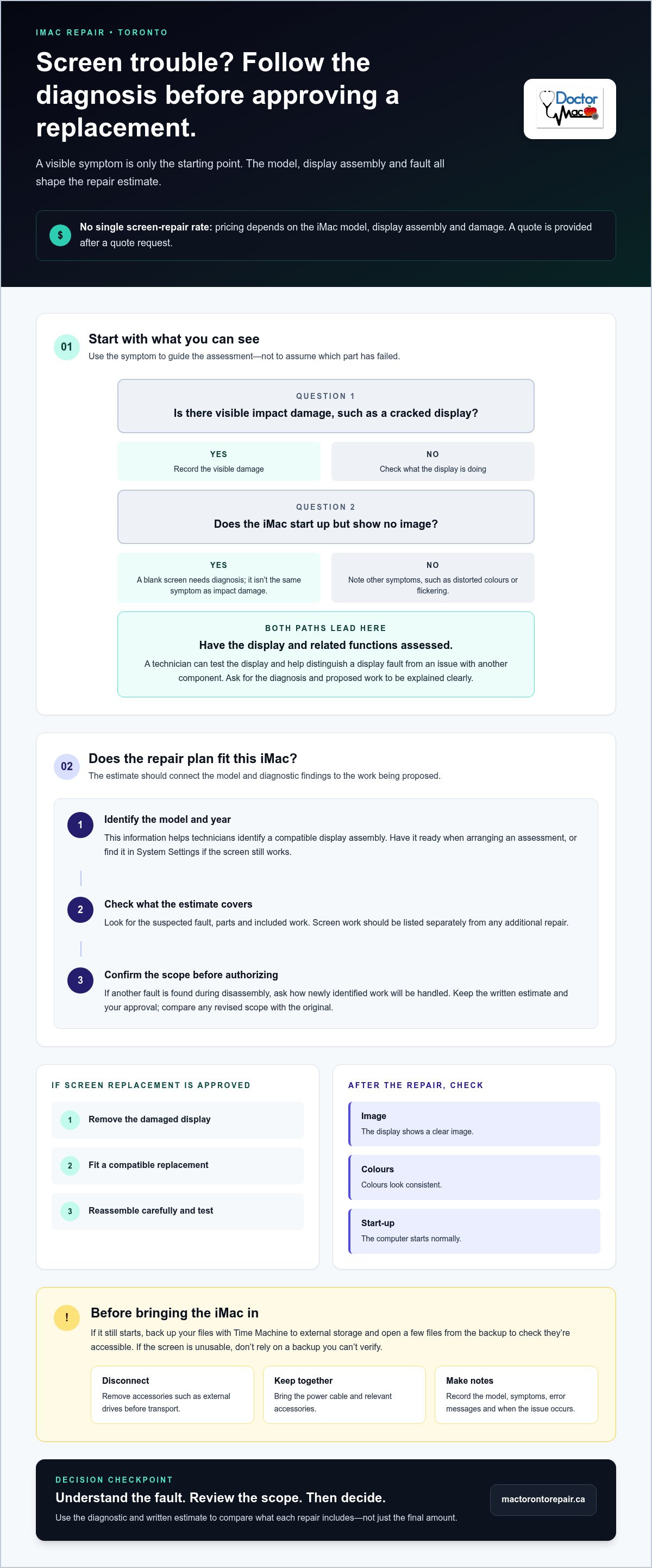
For iMac repair in Toronto, screen replacement pricing depends on the model, display assembly and damage involved. The price depends on the case and is provided after a quote request. A cracked display, a blank screen and distorted colours can point to different faults. The visible symptom is only the starting point for identifying the repair.
The iMac’s model and year help technicians identify a compatible display assembly. Have the model information ready when arranging an assessment, or find it in the device’s system settings if the screen still works. The estimate should explain whether the proposed work addresses the display itself or another component affecting the image. That distinction makes the repair scope easier to understand.
Before replacing a screen, a technician can assess the display and test related functions. For example, a computer that starts up but shows no image needs a different diagnosis from one with visible cracks. These checks help narrow down the fault instead of treating every display symptom as broken glass. Ask for a clear explanation of the diagnosis and proposed work.
Screen replacement involves opening the iMac, removing the damaged display and fitting a compatible replacement. The repair also requires careful reassembly and testing. After the work, check that the display shows a clear image, colours look consistent and the computer starts normally. The estimate should list screen work separately from any additional repair.
Pickup, delivery and on-site iMac repair aren’t available in the same way across Toronto. The repair shop’s service model and the work required determine whether the computer is handled at home or brought in for bench work. Since an iMac is a desktop device, plan how to transport it safely if you need to drop it off.
Back up your files before taking the iMac in, if it still starts. Time Machine can copy files to an external storage device. Open a few files from the backup to confirm they’re accessible. If the screen is unusable, don’t rely on a backup you can’t verify. Also note the iMac model, symptoms and examples of when the problem occurs.
Disconnect accessories such as external drives before transport.
Keep the power cable and any relevant accessories together.
Write down error messages or changes you noticed before the screen failed.
These preparation steps give technicians useful context and protect important files. A free diagnostic can help identify whether the display or another component needs attention. Use the findings to understand the proposed repair before approving the work.
Choosing a repair shop and spotting red flags
Choose a Toronto repair shop that can explain the specific iMac fault, not just repeat the symptom. A black screen, flickering image and cracked display call for different diagnostic steps. Look for a clear description of what technicians will test and how the findings shape the repair plan. For iMac repair in Toronto, the diagnosis should link the reported problem to the proposed work.
Start with the estimate. It should identify the iMac model, suspected fault, included work and parts. For example, an estimate for a display problem should distinguish screen replacement from investigating a graphics or power issue. Without those details, you can’t tell whether two estimates cover the same work. Get the scope in writing before approving the repair.
AppleCare also affects how you compare service options. For Mac service covered by an AppleCare plan, the service fee is the same at Apple and all Apple Authorized Service Providers. Outside that coverage, Apple Authorized Service Providers set their own service fees and provide their own estimates. Check whether your plan applies, then compare the proposed repair scope and coverage.
Ask how the shop handles a change in scope. If technicians find another fault after opening the iMac, they should explain the additional work and cost before proceeding. An estimate that leaves extra repairs open-ended makes it difficult to understand what you’re authorizing. Keep the original estimate and any revised approval together so the agreed work stays clear.
Parts and workmanship terms deserve close attention. Read the repair warranty to see which installed component it covers, how to report a fault and what exclusions apply. For example, a warranty covering a repaired display may not cover later impact damage. A shop should explain its terms in plain language and provide them in writing. A practical benchmark is a parts-and-labour warranty of 30-90 days.
Consider the testing process, not just the estimate. For a display repair, ask how the shop checks image quality, brightness, startup and normal operation. Battery repairs require different checks. Specific testing shows how the process addresses the reported fault. Avoid vague assurances that don’t say what the shop will test after the work.
Useful signs: A written diagnosis, itemized scope, clear approval process and understandable warranty terms.
Red flags: Pressure to approve immediately, unclear parts descriptions or promises without a stated repair plan.
Before handing over the device: Record its model and condition, remove unrelated accessories, and keep a copy of the estimate.
Compare estimates by matching the model, diagnosis, parts, labour and warranty. A lower total may describe a different repair scope. A careful comparison helps you understand what the shop will do, how it will test the iMac and what support applies after the repair.
Free diagnostics
A free diagnostic helps identify why an iMac isn’t working as expected before repair work begins. It’s an assessment, not a replacement screen or completed repair. For example, a blank display could result from a screen fault, a power issue or another component. The diagnostic narrows down the likely cause so the proposed repair addresses the problem, not just the visible symptom.
Start by describing what the iMac does and when the issue began. Note details such as flickering after startup, lines across the display or shutdowns during a specific task. These observations give technicians a useful starting point. If macOS still opens, include any error message you can reproduce. A clear symptom history can help distinguish a recurring fault from an isolated event.
For iMac repair in Toronto, the diagnostic should connect the reported problem with relevant checks. A display complaint, for example, calls for checking whether the iMac starts and whether an image appears. If the screen stays dark, that symptom alone doesn’t identify the failed component. The assessment helps explain the findings, possible repair options and what the estimate covers.
Use the diagnostic result to review the next step:
Diagnosis: Understand the suspected fault, such as a damaged display or a startup issue.
Repair scope: Match the proposed work to the findings and iMac model.
Estimate: Review the parts and labour included before approving repairs.
Approval: Decide whether to proceed once you understand the recommended work.
An assessment doesn’t mean parts or repair labour are free. It gives you information before you decide. For instance, an estimate for a screen replacement should explain whether it covers the display assembly and related work. If testing points to another component, the estimate should describe that separate repair rather than treating every fault as a screen problem.
Prepare for the appointment by noting the iMac model and writing a concise list of symptoms. If the device still works, describe when the fault appears, such as after login or while using a particular application. Back up important files before service when possible. A backup protects your data, while the diagnostic focuses on identifying the issue affecting the computer.
Use the findings to decide whether the proposed repair fits the problem you reported. Ask for a plain-language explanation of the fault, recommended work and estimate scope. The process is straightforward: describe the symptoms, review the diagnosis, then approve the work that addresses the identified issue.
How long does iMac repair take at Toronto repair shops?
Repair time depends on the fault, required parts and testing after the work. A display replacement follows a different process from liquid-damage repair. A technician first assesses the iMac, identifies the affected component and confirms the repair scope. This diagnostic step helps clarify the timeline before work begins.
Parts availability affects the schedule. A compatible display assembly must match the iMac model, so technicians need accurate model details before selecting parts. If a required component isn’t ready, repair work must wait for it to arrive. A repair that needs no additional parts follows a different timeline from one that depends on a specific component.
Liquid damage adds inspection and testing steps. Moisture can affect more than one internal component, so technicians need to assess the affected areas before determining the work. Liquid-damage repairs can be completed within 2 business days. The repair process includes addressing the damage and checking the computer’s operation afterwards, rather than stopping once it powers on.
Screen work involves more than fitting a replacement. The technician removes the damaged display, installs a compatible part and tests the image. Checks can include startup, display quality and normal operation. If testing reveals another fault, the repair scope changes and adds work beyond the original screen replacement.
Ask for a timeline tied to the diagnosed issue and repair steps. A useful update explains whether the iMac is awaiting assessment, parts, repair or final testing. These stages help you understand what remains, especially when the original symptom doesn’t identify the failed component.
Assessment: Record the iMac model and describe when the fault occurs.
Parts: Confirm whether the repair needs a model-specific component.
Repair: Understand which work addresses the diagnosed issue.
Testing: Allow time to check the repaired function before pickup.
Before arranging transport, back up important files if the iMac still works. Bring the power cable if it’s needed for testing. Share practical details, such as whether the screen flickers only after startup or remains blank from power-on. Those examples help technicians reproduce the fault and focus their assessment.
A fast repair still needs the right diagnosis and final checks. For an iMac repair in Toronto, ask for a clear sequence of steps and an update when the repair status changes. Arrange an iMac repair assessment to start the process and discuss the issue affecting your desktop.
Doctor Mac Toronto: Macbook Screen Repair
Doctor Mac Toronto is a practical next step if your repair needs involve a MacBook screen, battery, logic board or SSD. Its technicians use premium parts, and installed hardware components come with a 90-day warranty. The right repair depends on the affected device and the fault identified, so share the symptoms and model when describing your issue.
If you’re comparing repair options, review the estimate and warranty terms before approving work. For MacBook screen problems, a clear diagnosis helps you understand the proposed repair and what it covers.
Contact Doctor Mac Toronto or visit the website to discuss your repair needs.
Choose your next repair step with confidence
Before committing to an iMac repair in Toronto, decide what matters most: restoring the display, resolving another fault or protecting files. Use the diagnosis and written estimate to choose a repair path that fits the computer’s condition and your needs. A clear decision helps keep the next steps focused.
Doctor Mac Toronto offers MacBook screen repair, battery replacement and logic board repair. If you’re also dealing with a MacBook issue, these services can address common hardware problems separately from your iMac assessment.
Share the device model and symptoms when describing the issue. This gives the repair conversation a practical starting point and helps clarify the work you’re considering. Keep your estimate and repair records together so you can refer to the agreed scope later.
For help with a MacBook screen, battery or logic board repair, contact Doctor Mac Toronto. A clear next step can make a frustrating computer problem easier to manage.
Frequently Asked Questions
How much will it cost?
The repair price depends on the iMac model, faulty component and work required. Replacing a display assembly differs from diagnosing a computer that won’t start or show an image. If testing identifies another fault, the repair scope may change. For iMac repair in Toronto, request an estimate based on the device’s symptoms and model, then review the proposed work before approving it.
Is there a service guarantee?
Doctor Mac Toronto provides a 90-day warranty on hardware components installed during service. That covers installed hardware components, not a blanket promise that every unrelated issue will be repaired at no cost. Keep the service record and ask for the warranty terms in writing. If a problem appears, the repair date and details help clarify whether it involves the installed component or a separate issue.
What Makes a True Mac Repair Specialist?
A Mac repair specialist can connect a symptom to a practical diagnostic plan, explain the proposed repair and identify compatible parts for the device. For example, a blank screen may require testing beyond the display itself. Doctor Mac Toronto’s technicians have over 20 years of experience and use premium parts. Clear explanations and relevant testing help you understand the work before authorizing it.
What’s covered under warranty?
Apple’s Limited Warranty covers manufacturing issues for one year from purchase, but excludes accidental damage and batteries worn through normal use. AppleCare for Mac covers the Mac, its battery and included power adapter for accidental damage. Apple guarantees repair service and replacement parts for 90 days or the remaining Apple warranty term, whichever is longer. These Apple terms differ from an independent shop’s installed-parts warranty.
Where can I get service?
In Toronto, Doctor Mac Toronto offers in-store, mail-in and on-site repair options. Choose the service format that suits your situation and device. For example, a desktop iMac may be easier to transport for in-store assessment, while another repair may suit a different arrangement. Describe the model and problem when arranging service so the conversation starts with useful details.
Where can I get an iMac repaired in Toronto?
Doctor Mac Toronto provides Mac repair services in Toronto, including iMac repairs. Before arranging service, note the iMac’s model and describe the fault, such as a flickering display or failure to start. Back up files first if the computer still works, and bring only accessories relevant to the reported problem. These details help the repair team understand what you’re experiencing.
Which Toronto iMac repair shops are Apple Authorized Service Providers?
Apple Authorized Service Providers are locations designated by Apple for authorized service. Doctor Mac Toronto provides independent repair services and does not offer Official Apple Authorized Warranty Service. If you need AppleCare-covered service, the distinction matters: Apple states that the service fee is the same at Apple and all Apple Authorized Service Providers. For independent repair, review the diagnosis, estimate and warranty terms.
How much does iMac screen or display repair cost in Toronto?
The estimate depends on the iMac model, display assembly and whether testing finds related damage. A cracked screen and a display that stays black can have different causes and repair scopes. The estimate should make clear whether it covers display replacement alone or other necessary work. Share the model and symptoms when requesting a quote, then review the scope before approving the repair.


Comments