


Mac Mini Repair Toronto: Expert Hardware Fixes and Performance Upgrades
Updated: Jul 16
Your Mac Mini isn't a disposable paperweight just because the fan is screaming or the SSD seems locked away forever. If you're searching for reliable mac mini repair toronto, you likely need a solution that doesn't involve the high cost of buying a whole new machine. We understand the pressure of unexpected downtime and the fear of losing data on integrated components. You deserve an honest assessment of your hardware rather than a push toward an expensive replacement.
The truth is that most hardware bottlenecks are solvable with specialized component-level fixes. You can resolve these failures and get your machine back to peak performance with a professional touch. This article explains how expert repairs can extend your device's life by several years while keeping your data secure. We cover common hardware fixes, the benefits of Canada's Bill C-244 Right to Repair legislation, and how to decide if a repair or an upgrade is your best path forward.
Table of Contents
Common Mac Mini Issues: Recognizing the Symptoms
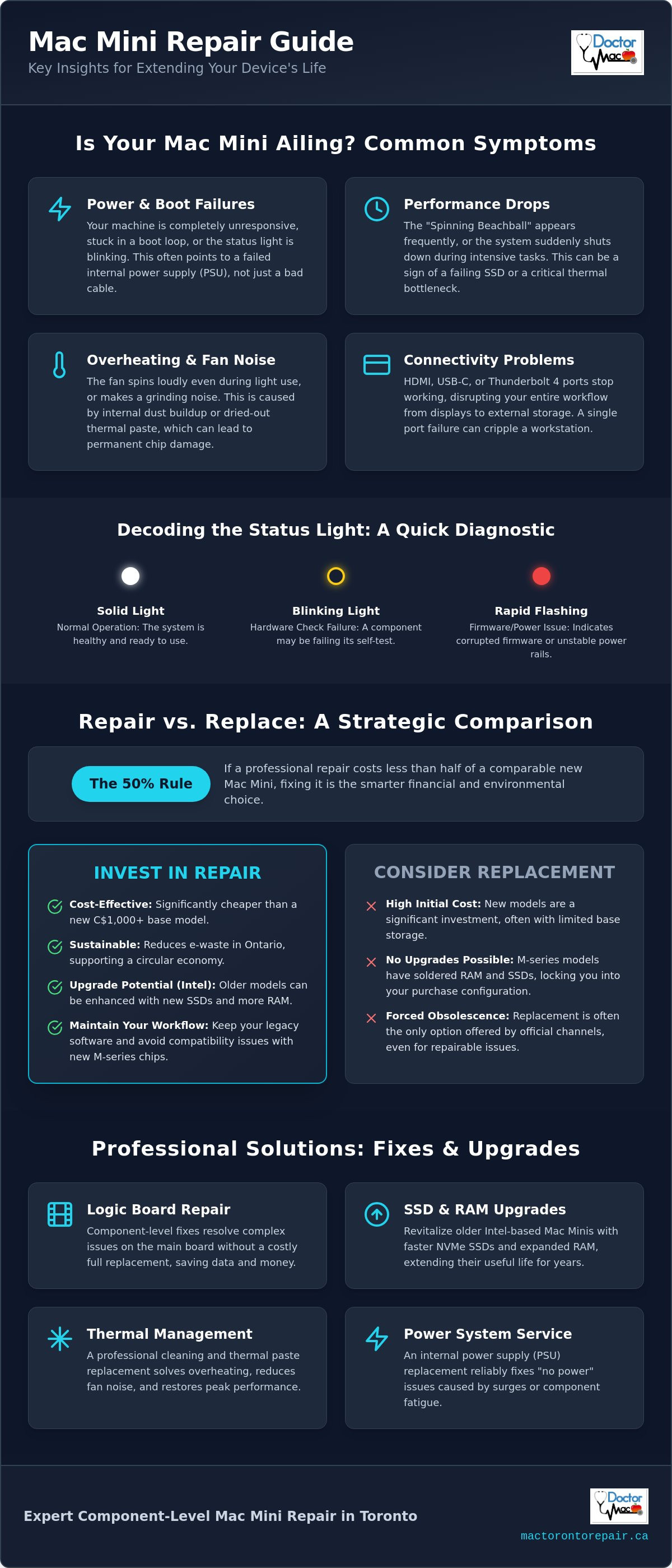
The Mac Mini is a marvel of engineering, but its dense internal layout creates unique hardware risks. Unlike a MacBook, this desktop relies on an integrated internal power supply that handles 100-240V AC directly. If your machine is completely unresponsive, don't panic immediately. Check the power cord first. If the cord works on another device but your Mini stays dark, the internal power supply has likely failed. This is a frequent issue we see when providing mac mini repair toronto for local professionals who need their workstations back online quickly.
Performance drops often manifest as the "Spinning Beachball" of death. While software can cause this, it is frequently a sign of a failing SSD or a thermal bottleneck. You might experience sudden shutdowns during intensive tasks like video rendering or compiling code. These failures are often linked to the logic board or the thermal management system. Additionally, connectivity issues with HDMI, USB-C, or Thunderbolt 4 ports are common. Since the Mac Mini uses these ports for everything from displays to high-speed storage, a single port failure can disrupt your entire workflow.
Power and Boot-Up Failures
The internal power supply unit (PSU) is a hard-working component that can fail due to power surges or simple component fatigue. You can often diagnose the severity by watching the LED status indicator. A solid light is normal, but a blinking light indicates a hardware check failure. Rapid flashing usually means the firmware is corrupted or the power rails are unstable. Logic Board failure is the primary cause for boot loops in older models. When the board cannot complete its Power-On Self-Test, the system restarts indefinitely.
Thermal Management and Overheating
Toronto's urban environment contributes to significant dust buildup inside compact electronics. Because the Mini pulls air from the bottom and exhausts it through the back, the internal heatsink acts like a filter. Once clogged, the fan must spin faster to compensate, leading to excessive noise. Dried-out thermal paste is another silent performance killer. After several years, the original paste becomes brittle and fails to bridge the gap between the CPU and the heatsink. If your system throttles its speed or the fan makes a grinding noise, a professional cleaning or a mechanical fan replacement is necessary to prevent permanent chip damage.
Mac Mini Repair vs. Buying New: A 2026 Comparison
Deciding whether to salvage your desktop or invest in a new M4 or M5 model depends on your specific workflow. While the latest Apple Silicon chips offer impressive AI performance, many Toronto users find that their existing hardware still has plenty of life. If you're looking for mac mini repair toronto, the first step is evaluating the return on investment. Repairing a high-end Intel Mini or an M1/M2 model is often the smarter financial move than spending C$1,000 or more on a brand-new entry-level unit with limited storage.
Intel-based Mac Minis remain workhorses for many creative professionals because they feature upgradable RAM and storage. You can't do that with newer models. For M1 and M2 series machines, the challenge lies in the soldered components. However, component-level logic board repair can bypass the need for a total board replacement. This approach aligns with the growing right to repair movement, giving consumers more control over their hardware. Beyond the savings, choosing repair reduces e-waste in Ontario, making it the more sustainable choice for our community.
When to Invest in Your Current Machine
We recommend the "50% Rule" for most hardware decisions. If a professional repair estimate is less than half the cost of a comparable new machine, fixing it is the logical choice. Specialized logic board repair is significantly cheaper than a full replacement at an Apple Store. Many vintage models from 2014 or 2018 still excel as home servers or dedicated media centres once they receive a fresh SSD or a thermal service. Before you write off your device, consider a professional logic board assessment to see if a cost-effective fix is available.
The Limitations of Newer M-Series Models
Newer Mac Minis utilize unified memory that is integrated directly into the chip. This design boosts speed but makes upgrades impossible after purchase. If you rely on legacy 32-bit apps or specific Intel-only workflows, maintaining your older machine is essential. Doctor Mac Toronto helps you realize the full potential of your existing hardware by identifying exactly which parts need attention. We focus on extending the usable life of your machine by several years, ensuring you get the most value out of your original investment.
Core Hardware Repairs: Logic Boards and Power Systems
Desktop hardware failures require a different technical approach than laptop repairs. While many service centres treat a logic board as a single, disposable part, we focus on component-level restoration. Finding reliable mac mini repair toronto often means looking for technicians who can perform microsoldering to replace individual chips, capacitors, or resistors. This specialized approach aligns with the Government of Canada's stance on the Right to Repair, which encourages extending the life of electronics through competent servicing rather than forced replacement.
The internal power supply is another critical failure point. Because the Mac Mini houses its power transformer inside the chassis, it is susceptible to heat fatigue and electrical surges. A "dead" machine often just needs a PSU swap, which we can frequently complete with a 1-hour turnaround. We also address physical damage to HDMI and Thunderbolt ports. These ports face significant strain from heavy cables and frequent plugging, leading to cracked solder joints that interrupt your video signal or data transfer.
Integrated storage presents a unique challenge for data security. On newer models, the flash storage is soldered directly to the logic board. If the board fails, your files are trapped. Our data recovery process involves stabilizing the power rails on the original board to allow for a temporary boot or using advanced tools to read the chips directly. We prioritize your data integrity throughout the entire repair sequence.
Specialized Logic Board Troubleshooting
Most boot issues stem from failures in the voltage regulator modules that manage the power rail. Our technicians use high-resolution schematics to trace these faults under a microscope. We organize a methodical microsoldering workflow to remove shorted components and install premium replacements. This precision ensures your original board remains stable for years, avoiding the high cost of a total system overhaul. We back this workmanship with a 90-day warranty on all premium parts used during the fix.
Port and Peripheral Connectivity Fixes
Physical port wear-and-tear is more common on desktops because they often stay connected to heavy peripherals for months at a time. This constant tension can weaken the internal housing of USB-C or HDMI connectors. We also frequently replace faulty Wi-Fi and Bluetooth antennas. These internal components can degrade or become disconnected, leading to dropped internet signals or stuttering mouse movement. A deep internal cleaning is included with these services to remove conductive debris that could cause future short circuits.
Performance Upgrades to Future-Proof Your Mac Mini
Upgrading your current desktop is the most effective way to bypass the premium price tags of newer M-series models. While Apple Silicon offers integrated speed, many Toronto users prefer the flexibility of older hardware that allows for physical modifications. When you choose mac mini repair toronto for an upgrade, you aren't just fixing a fault. You're transforming a sluggish machine into a modern workstation capable of handling demanding creative suites. These enhancements provide a bridge to high-performance computing without requiring a total system replacement.
Modern workflows require more than just a functional logic board. If your machine still uses a mechanical hard drive or an early-generation SATA SSD, you're missing out on significant processing power. Transitioning to high-speed NVMe storage can increase data transfer rates by over 30 times compared to legacy drives. We also assist with external GPU (eGPU) setups for Intel-based models. This allows creative professionals to achieve desktop-class graphics performance for 3D rendering or AI workloads that the internal chip simply can't manage alone.
SSD and Storage Enhancements
The speed difference between an old mechanical drive and a modern NVMe SSD is the single most noticeable upgrade you can perform. Modern solid-state storage eliminates the lag associated with opening large files or booting the system. We prioritize safe data migration during every hardware upgrade, ensuring your folders and settings remain exactly where you left them. If you're managing a complex workspace with multiple Apple devices, you might also be interested in our MacBook Screen Repair Toronto service to keep your mobile setup as sharp as your desktop.
Memory (RAM) Upgrades for Multitasking
Only specific models, such as the 2018 Intel Mini, allow for physical RAM replacement. For these machines, maxing out the memory to 32GB or even 64GB is a game-changer for 4K video editing and heavy multitasking. Modern software often requires higher baseline specs than what was standard five years ago. Increasing your RAM ensures your system doesn't swap data to the drive, which keeps your workflow fluid and responsive. If you're ready to boost your speed, book an SSD or RAM upgrade today to see what your machine can really do.
Professional Mac Mini Repair in Toronto: The Doctor Mac Process
Efficiency defines our service workflow because we know that a broken workstation halts your productivity. Our approach to mac mini repair toronto is methodical and designed to eliminate guesswork. It begins with a rapid diagnostic at our Toronto centre to pinpoint the exact hardware failure. Whether it's a shorted capacitor on the logic board or a failing internal power supply, we identify the root cause before any work begins. This ensures we address the actual problem rather than just the symptoms.
Once the diagnostic is complete, we provide a transparent quote with no hidden fees for parts or labour. You'll know exactly what the fix costs before you commit. Our technicians then perform a precision repair using over 20 years of specialized Apple expertise. We don't just swap boards; we use microsoldering and premium components to restore your original hardware whenever possible. Every machine undergoes comprehensive stress testing to ensure stability under heavy workloads, backed by a solid 90-day warranty on all parts and labour.
Why Toronto Professionals Trust Us
We prioritize speed for our local clients. For common hardware issues like internal power supply swaps, we aim for a 1-hour turnaround to get you back to work immediately. Our service centre is conveniently located in the Toronto Koreatown area, making drop-offs and pick-ups simple for anyone in the downtown core. We pride ourselves on being the trusted specialist who provides honest, technical authority with a friendly, community-focused approach. You can rely on us for a straightforward assessment of whether a repair or a replacement is your most cost-effective path forward.
Warranty and After-Service Support
Your peace of mind is our priority. Our 90-day hardware warranty covers any premium parts we install and the specific labour performed on your machine. If a component fails within this period, we fix it at no extra cost. We also provide free follow-up advice on how to maintain your Mac Mini in a home office environment. Simple steps like keeping the bottom air intake clear of dust and monitoring thermal levels can prevent future hardware stress. If your desktop is acting up or won't boot, Book your Mac Mini repair appointment today and let our experts restore your machine to peak performance.
Restore Your Productivity and Extend Your Hardware Life
Your Mac Mini is a high-performance tool that doesn't need to be replaced just because of a power failure or a thermal bottleneck. Choosing professional mac mini repair toronto saves you significant costs compared to purchasing a new M4 or M5 model. Component-level fixes for logic boards and power supplies are cost-effective and align with Canada's Bill C-244 Right to Repair legislation. Whether you're upgrading an Intel model to handle modern software or recovering data from a non-responsive board, the right technical intervention adds years of value to your machine.
Don't let technical failures disrupt your workflow or lead to unnecessary hardware waste. We provide a steady hand and a transparent process to get your desktop running like new. With 20+ years of technical experience and a 90-day warranty on all premium parts, you can trust that your hardware is in expert hands. We use only premium parts to ensure long-term stability and professional results.
Get Your Mac Mini Fixed Today - Contact Doctor Mac Toronto
Your machine has plenty of life left in it. We look forward to helping you realize its full potential and getting your Toronto home office back to peak efficiency.
Frequently Asked Questions
How much does it typically cost to repair a Mac Mini in Toronto?
Repair costs vary depending on the specific hardware failure and the generation of your machine. A simple internal part swap or power supply fix is more affordable than a complex logic board restoration involving microsoldering. We provide a transparent quote after a rapid diagnostic, ensuring you know the total investment before we start any work. This helps you compare the repair cost against the price of a brand-new unit without any hidden fees.
Is it worth repairing an Intel-based Mac Mini in 2026?
Repairing an Intel-based Mac Mini in 2026 is often worth it for professional workflows or dedicated home server setups. While the newest macOS versions might not support these models, they remain excellent machines for running legacy software, Linux, or local media servers. If the hardware fix extends the device life for a fraction of the cost of a new M5 model, it is a smart financial move that keeps a capable machine out of the landfill.
Can you recover data from a Mac Mini that won’t turn on?
We can recover data from Mac Minis that won't turn on, even those with integrated flash storage soldered directly to the logic board. Our technicians use microsoldering to stabilize the power rails or repair the board enough to access the encrypted data. This is a critical service for users who haven't backed up to a cloud service. We prioritize your data integrity during every mac mini repair toronto procedure to ensure your files remain safe.
How long does a Mac Mini power supply replacement take?
A Mac Mini power supply replacement typically takes about one hour at our Toronto centre. We keep common internal power supply units in stock to ensure a fast turnaround for local professionals who can't afford long delays. This speed minimizes your downtime and often allows for same-day service. If your machine requires a specialized part that isn't in our current inventory, we will provide a clear timeline during your initial quote.
Do you provide a warranty for Mac Mini logic board repairs?
Every logic board repair we perform comes with a comprehensive 90-day warranty on both parts and labour. We use premium components to ensure the long-term stability of your system after a microsoldering procedure. This warranty reflects our confidence in our 20 years of technical experience and our commitment to quality. If you experience any issues related to the specific repair within that period, we will address them at no extra cost.
Can I upgrade the RAM in my M1 or M2 Mac Mini?
You cannot upgrade the RAM in M1 or M2 Mac Mini models because the memory is integrated directly into the Apple Silicon chip. This unified memory design is built for speed but is permanently soldered and non-removable. If your M-series machine is sluggish, we can investigate storage optimizations or software cleanups to improve performance. For users who strictly require physical RAM expansion, maintaining an older Intel model is often a better strategy.
Where is your Toronto repair shop located?
Our repair shop is located in the Koreatown area of Toronto, providing a central and accessible spot for desktop drop-offs and pick-ups. We are situated to serve professionals across the downtown core who need reliable hardware support without the hassle of a large shopping mall. Our local presence allows us to focus on high-quality, personalized service. This convenient location is a key reason why we are a top choice for mac mini repair toronto.
Do I need an appointment for a Mac Mini diagnostic?
You don't need an appointment for a diagnostic, though booking one ensures the fastest possible turnaround for your assessment. We welcome walk-ins at our Toronto centre and can often begin the initial check immediately to identify obvious power or boot issues. A rapid diagnostic allows us to pinpoint the failure and provide you with a transparent quote right away. This efficient process respects your time and helps you make an informed decision quickly.


Comments