


5 Signs You Need a MacBook Screen Replacement: A Toronto Owner’s Checklist
Updated: Jul 30
Is that flickering line on your MacBook a sign of total hardware failure, or could it be a simple software glitch you can fix yourself? Most owners assume a cracked glass panel is the only reason to seek a macbook screen replacement toronto, but subtle changes in colour or brightness often point to deeper hardware problems. You've likely spent hours staring at a glitching screen, worrying about the high cost of an Apple Store visit or the fear of losing your data during a long repair process. It's a stressful situation for any professional who relies on their device every day.
We understand that you need your laptop back in working order without the corporate price tag. This guide will help you identify the specific symptoms of a failing display so you can determine if your device requires a simple fix or a full panel swap. We will preview the five critical signs of hardware failure, compare the costs of different screen technologies, and show you how to find a local specialist who offers reliable results. You'll gain a clear path toward a functional screen and the peace of mind that comes with an expert diagnosis.
Table of Contents
MacBook Screen Damage Checklist: Identifying Your Display Issue
Identifying exactly what happened to your display is the first step toward getting back to work. While some damage is obvious, other issues are deceptive. You might see a faint image or a sudden shift in colour that makes you wonder if a macbook screen replacement toronto is truly necessary. Before you commit to a repair, run through this diagnostic checklist to pin down the fault. Most display issues fall into one of these categories:
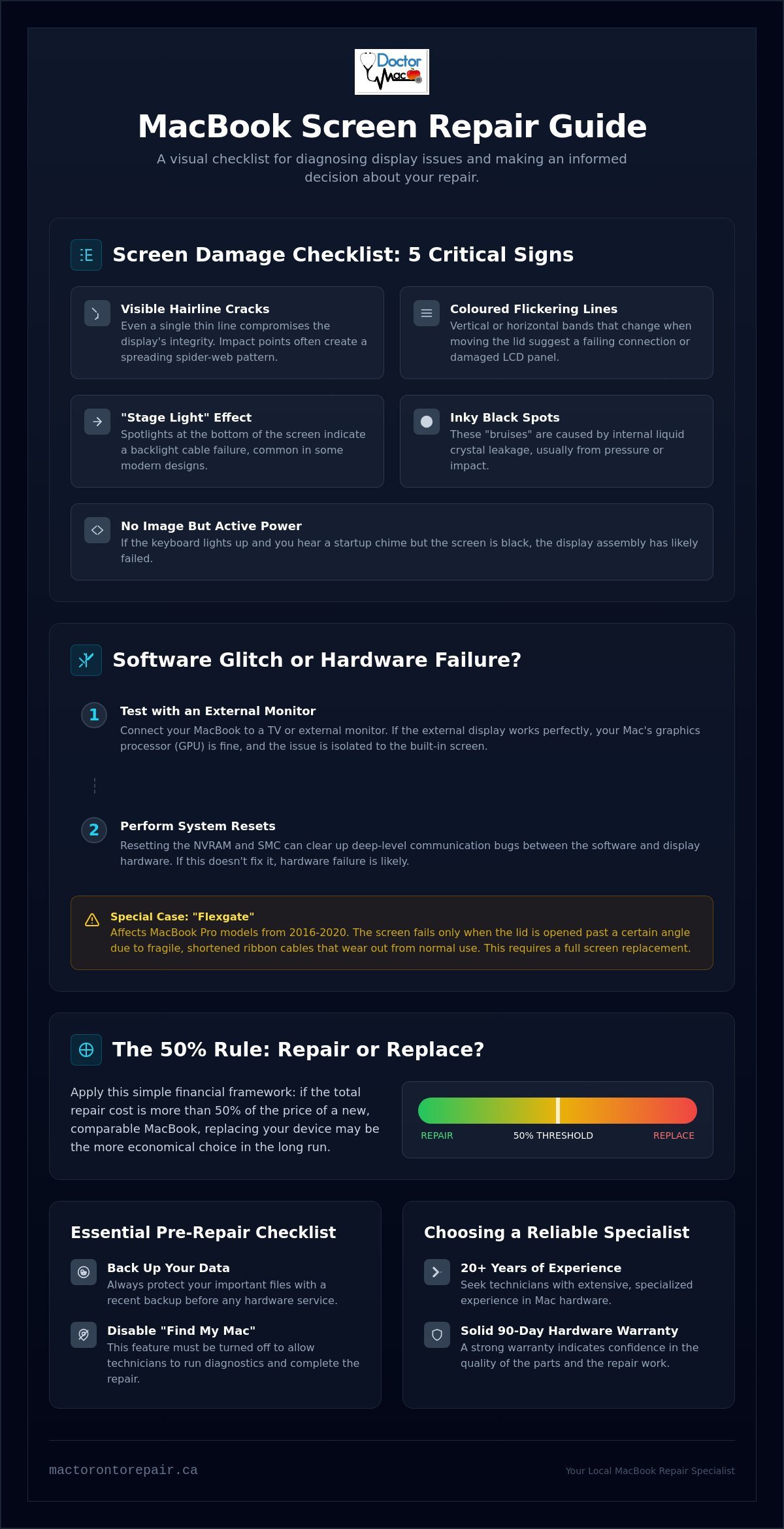
Visible hairline cracks: Even a single thin line across the glass can compromise the structural integrity of the assembly. Impact points often create a spider-web pattern that spreads over time.
Coloured flickering lines: Vertical or horizontal bands that change when you move the lid suggest a failing connection or a damaged LCD panel.
The "Stage Light" effect: If the bottom of your screen looks like it's lit by individual spotlights, you're likely dealing with a backlight cable failure common in newer designs.
Inky black spots: These "bruises" occur when the internal liquid crystal leaks. This is usually caused by pressure or an object being left on the keyboard when the lid is closed.
No image but active power: If your keyboard lights up and you hear the startup chime but the screen stays black, the display assembly or its internal power rail has likely failed.
Physical Damage vs. Internal Failure
It's vital to distinguish between a cracked outer layer and a dead internal panel. Newer models use a sophisticated Retina display where the glass and LCD are fused into a single unit. On older models, you might only need to replace the glass; however, for anything manufactured in the last decade, any impact usually requires a full assembly swap. If you notice "ghosting" where faint images of old windows remain on the screen, this might be temporary image retention. If those ghosts never fade, the pixels themselves are failing. We often see issues with the eDP (Embedded DisplayPort) cable where the screen works at certain angles but cuts out when the lid is fully opened.
Software Glitch or Hardware Disaster?
Don't panic just yet. Sometimes macOS has a bad day. Plug your MacBook into an external monitor or your TV. If the external display looks perfect, your GPU is fine, and the problem is definitely your laptop screen. You should also try resetting the NVRAM and SMC. These are deep-level resets that can occasionally clear up display communication bugs. If you own a MacBook Pro from 2016 to 2020 and the screen only fails when opened past a certain point, you're likely a victim of "Flexgate." In these cases, a macbook screen replacement toronto is the only permanent solution to fix the fragile, shortened ribbon cables that eventually wear out from normal use.
Understanding MacBook Display Technology: Retina vs. Standard
MacBooks have evolved from modular laptops into highly integrated machines. If you own a model produced in the last decade, you're likely using a Retina display. This technology isn't just a marketing buzzword; it represents a fundamental shift in how screens are built. Older screens consisted of separate layers you could take apart. Modern units are a single, fused assembly. This means the LCD, the backlight, and the protective glass are bonded together with optically clear adhesive. When you seek a macbook screen replacement toronto, you're usually replacing the entire top half of the laptop, not just a single pane of glass.
The backlight in modern LED-backlit panels is equally sophisticated. Instead of a separate bulb, it uses a series of microscopic LEDs integrated directly into the display layers. This integration allows for the incredibly thin profile of the MacBook Air and Pro. Furthermore, your display unit houses more than just pixels. It contains the FaceTime camera, ambient light sensors, and True Tone technology. True Tone sensors constantly measure the colour temperature of your room to adjust the display's white balance. Because these components are calibrated to the specific panel at the factory, a professional touch is required to ensure they function correctly after a repair.
The global conversation regarding the right to repair highlights how these integrated designs make DIY fixes much harder for the average user. Understanding these technical hurdles helps you realize why specialized tools are necessary for a successful outcome. If you're unsure which technology your specific model uses, you can browse our professional Macbook Screen Repair services to identify your device.
The Complexity of Retina Screen Replacement
You cannot simply replace the glass on a MacBook Pro Retina. Because the layers are fused, attempting to peel away the glass usually shatters the LCD underneath. Precision is the priority during this process. Aligning the FaceTime camera and the ambient light sensor requires a dust-free environment and exact measurements. Retina technology is a fused-layer display system that improves colour accuracy. This bonded design is why a full assembly swap is the industry standard for maintaining the high-resolution performance you expect from your Mac.
Legacy MacBook Displays
Older MacBook models are the exception to the rule. You can identify these by their thick silver bezels or the presence of a removable glass cover held in place by magnets or adhesive. These legacy displays are modular. This means a technician can often replace just the LCD panel or just the front glass while keeping the original aluminum lid. This modularity offers a major cost advantage for Toronto students or those using older hardware as secondary machines. While they lack the pixel density of newer models, these screens are easier to service and remain favourites for those who value repairability.
The "Repair vs. Replace" Framework for Toronto MacBook Owners
Deciding whether to invest in a macbook screen replacement toronto or buy a new machine requires a cold, hard look at the numbers. In the Greater Toronto Area, the used market is robust. This makes it easy to benchmark your device's current value against repair costs. We use a simple framework to help you decide if your Mac is worth the investment or if it has reached the end of its useful life.
A reliable industry standard is the 50% rule. If the quote for your display repair exceeds half the cost of an equivalent used model on local marketplaces, a replacement is often more logical. However, don't just look at the screen. We recommend assessing the internal health of the machine first. Check your battery cycle count and run a diagnostic on the logic board. A MacBook with a failing battery and a shattered screen is a money pit. But if the internals are pristine, a screen swap can add years to the device's life.
Software longevity is the final pillar. Check if your model is on the official "vintage" list. If your Mac won't support the next three versions of macOS, you are paying for hardware that will soon face security risks. The Consumer Reports on Right to Repair highlights how manufacturers are slowly making parts more accessible, but they can't make old processors faster. Realizing the resale price of your specific Mac model in the GTA is essential before signing off on a repair.
When Screen Replacement is the Smart Choice
High-spec machines are the best candidates for repair. If you have a MacBook with 16GB of RAM or a large SSD, it likely still outperforms the base-model Airs sold today. For these power users, a macbook screen replacement toronto is a fraction of the cost of a comparable new Pro. There is also the data factor. If your work is trapped on a broken device, repairing the screen is the fastest way to secure your files. Beyond the wallet, repairing reduces e-waste, which is a priority for many Toronto residents.
When it is Time to Say Goodbye
Some machines have reached their technical ceiling. If you use a pre-2015 model, the performance gap between your Intel processor and modern Apple Silicon is massive. We also advise against screen repairs if the technician finds evidence of liquid damage or failing SSD blocks. These secondary issues often lead to total failure months after the screen is fixed. Always compare your repair quote to the price of a certified refurbished unit. Sometimes, spending a bit more gets you a newer model with a fresh warranty and better battery life.
The Essential Pre-Repair Checklist: Preparing Your Mac for Service
Before you drop off your device for a macbook screen replacement toronto, taking twenty minutes to prepare your hardware ensures a smoother experience. Professional technicians handle hundreds of devices, but you are the primary guardian of your data. Following a structured checklist prevents delays and protects your privacy while your Mac is in the shop. A well-prepared laptop allows the specialist to focus entirely on the precision work of the display assembly swap.
Perform a full backup: Use Time Machine with an external drive or sync your critical folders to iCloud. While a screen repair is a hardware-only procedure, any technical service carries a small risk of data loss if the battery must be disconnected or the logic board handled.
Disable "Find My Mac": This is a mandatory step for most professional repairs. Find My Mac must be disabled to allow for hardware verification after the repair.
Remove firmware passwords: If you have set a deep-level firmware password, the technician cannot run diagnostic tools to verify the new display's performance or colour accuracy.
Locate your serial number: You can find this on the bottom casing of your MacBook in very small print. Providing this early helps the shop source the exact revision of the display assembly for your specific model year.
Clean the chassis: Wipe down the lid and keyboard. A clean device allows the specialist to spot secondary physical flaws, like bent corners or hinge tension issues, that might affect the fit of the new screen.
Data Security and Privacy
Privacy is a top concern for Toronto professionals. A reputable shop should not need your admin password for a standard screen fix. Instead, create a guest user account if you want the technician to verify the backlight and camera functionality within macOS. For maximum security, ensure FileVault encryption is active. This keeps your sensitive documents locked even if the drive is accessed. We prioritize transparency, so we only ask for the minimum access required to confirm the job is done right.
Logistics for Toronto Customers
Toronto is a fast-paced city, and we know you can't be without your laptop for days. Many shops in the downtown core or Koreatown offer 1-hour service, which is a game-changer for those commuting from the Financial District or University of Toronto. When you arrive, you usually don't need to bring your MagSafe or USB-C charger unless you suspect a secondary charging issue. Most professional centres have high-wattage power supplies ready at every bench. If you're ready to get started, you can book your Macbook Screen Repair online to skip the queue and secure your parts.
Choosing a MacBook Screen Specialist in Toronto
Selecting the right technician for a macbook screen replacement toronto requires more than a quick search for the lowest price. You are trusting a specialist with a device worth thousands of dollars. Look for a team with 20+ years of experience specifically in the Apple ecosystem. This longevity ensures they have seen every iteration of display technology and understand the delicate internal layout of modern Macs. A seasoned professional remains unfazed by the technical challenges of fused assemblies and fragile ribbon cables. They know exactly how to handle the specific torque of hinge screws and the sensitive routing of antenna cables.
A 90-day hardware warranty is the minimum standard you should accept for any professional repair. It provides peace of mind that the new panel is free from manufacturing defects or sudden backlight failure. Not all replacement screens are equal. We prioritize "Original Grade" premium parts that match the original factory colour accuracy and peak brightness. Cheap knock-offs often suffer from washed-out blacks or dead pixels within weeks of installation. Using high-quality components ensures your Retina display continues to perform as intended for years to come. This commitment to quality prevents the need for a second repair just months down the road.
Red Flags in Third-Party Repair
Be wary of shops that refuse to give a firm quote before seeing your device. If you provide your serial number, an experienced technician should know exactly which part is required and the associated cost. Extremely low prices are another warning sign. These often suggest the use of used or "B-grade" LCD panels that may have hidden bruising or backlight bleed. Finally, ensure the business has a physical Toronto storefront or service centre. Avoid "mobile-only" services that lack a secure environment for handling sensitive internal components or providing long-term accountability for their work.
The Doctor Mac Toronto Advantage
At Doctor Mac Toronto, we offer a specialized MacBook screen repair Toronto service designed for maximum efficiency. Our Koreatown-based shop understands that your time is valuable. We provide 1-hour turnarounds for many screen repairs, allowing you to drop off your device and pick it up after a short coffee break. Our expertise extends beyond simple part swaps. Doctor Mac Toronto technicians are specialists in complex logic board repair and liquid damage recovery. This deep technical knowledge means we don't just replace a broken screen; we verify the health of your entire system to ensure your Mac is truly reliable when it leaves our bench. We take pride in being a steady hand for customers navigating frustrating technical problems.
Restore Your MacBook Display Performance
You now have the tools to diagnose your display issues and decide if a repair fits your budget and device lifespan. Whether you are dealing with a hairline crack or a complex backlight failure, understanding the fused nature of Retina technology helps you make an informed choice. Deciding on a macbook screen replacement toronto doesn't have to be a stressful or lengthy process when you work with the right local experts. We've covered how to isolate hardware faults from software bugs and why high-spec machines are almost always worth the investment. By following our pre-repair checklist, you can ensure your data is secure and your device is ready for service.
Don't let a broken screen stall your productivity for another day. With 20+ years of Apple repair expertise, we use premium parts to ensure your Retina display maintains its perfect colour and clarity. Every repair comes with a 90-day warranty for your peace of mind. We focus on getting you back to work quickly without the high cost of a full device replacement. Get Your MacBook Screen Fixed in 1 Hour - Contact Doctor Mac Toronto Today. Your laptop will be back to professional standards before your next meeting.
Frequently Asked Questions
How much does it cost to replace a MacBook screen in Toronto?
Replacement costs depend on your specific model and the display technology it uses. Newer Retina assemblies involve more complex, fused components that cost more to source than older modular screens. We provide a firm quote once you provide your serial number, ensuring you don't face unexpected fees. This transparency helps you compare the repair value against the cost of a new device in the GTA market.
Will I lose my data if I get my MacBook screen replaced?
No, a screen replacement is a hardware-only procedure that does not involve your solid-state drive or operating system. Your files, photos, and applications remain exactly where you left them. While data loss is extremely unlikely, we always recommend performing a Time Machine backup before any technical service as a standard safety precaution for your peace of mind.
How long does a professional MacBook screen replacement take?
A professional macbook screen replacement toronto can often be completed in just one hour. We understand that local professionals and students can't afford to be without their primary workstation for days. By keeping premium parts in stock for most common models, we minimize your downtime and get you back to your schedule immediately. Complex cases involving secondary damage may take slightly longer for a full diagnostic.
Can I fix my cracked MacBook screen with a DIY kit?
Repairing a modern MacBook screen yourself is highly discouraged due to the extreme precision required. Modern Retina displays are fused units that house delicate FaceTime cameras and ambient light sensors. A single mistake during the opening process can sever fragile ribbon cables or damage the logic board. Professional technicians use specialized tools and dust-free environments to ensure these integrated components function perfectly after the swap.
Is it worth replacing the screen on a 5-year-old MacBook Pro?
It is often worth repairing a five-year-old MacBook Pro if the internal components like the logic board and battery are still healthy. High-spec models with 16GB of RAM often still outperform modern entry-level laptops. If the repair cost is less than half the resale value of the device, a screen replacement is a financially sound way to extend its life for several more years.
What is the difference between a glass repair and a full display assembly?
Glass repair involves replacing only the outer protective layer, which is only possible on very old MacBook models with removable bezels. On all modern MacBooks, the glass and LCD are bonded together as a single display assembly. Replacing the entire top half ensures that the backlight, camera, and sensors are perfectly aligned and prevents dust from getting trapped between the layers during the repair process.
Do you offer a warranty on MacBook screen repairs in Toronto?
Yes, we provide a 90-day hardware warranty on every macbook screen replacement toronto we perform. This warranty covers any manufacturing defects in the new panel, such as sudden pixel failure or backlight issues. We stand behind our workmanship and the premium quality of our parts, ensuring your investment is protected long after you leave our Koreatown shop.
Can a MacBook screen be repaired if it has vertical lines but no cracks?
Yes, vertical lines usually indicate a failure of the internal LCD panel or a damaged LVDS cable rather than a broken glass surface. This often happens due to internal pressure or a failing connection at the hinge. While the glass looks perfect, the underlying display hardware is faulty and typically requires a full assembly replacement to restore a clear, flicker-free image.


Comments